Data Source Creation
This topic covers the initial setup steps and generic configuration parameters required when adding any new data source to the Knowledge Base.
To create a new data source container in the AI Agent Knowledge Base, select your AI Agent, then navigate to NLU > Knowledge Base. Click the + Add new button at the top right corner of the page. The Add New Data Source modal appears.
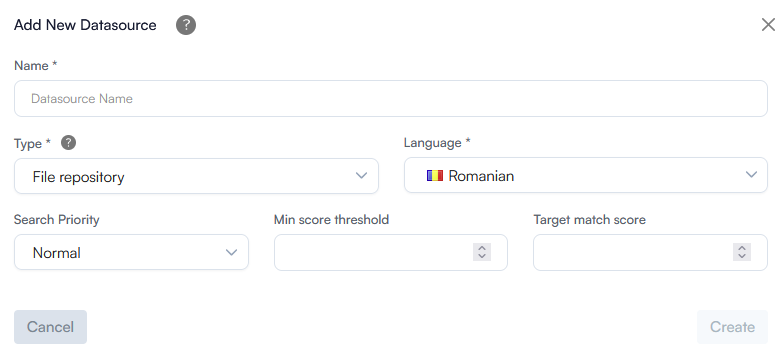
Complete general settings outlined below, then proceed to your specific data source configuration. For more information about a specific data source, refer to the relevant data source type topic.
| Parameter | Description | Mandatory |
|---|---|---|
| Name | A unique, descriptive name for the data source. Use a clear naming convention that indicates the content type and department (e.g., HR_Policies_SharePoint or Public_FAQ_Website). | Yes |
| Type | Select the data source type. Based on the selected type, specific settings display on the configuration modal. | Yes |
| Language |
The primary language of the files or web pages being ingested. IMPORTANT! The data source language must match the language of your active AI Agent. If the language settings do not align, the NLP engine will not be able to accurately parse, or retrieve the content during user interactions.
|
Yes |
| Search Priority |
Defines the relative weight assigned to the data source during KB vector search. Options include:
Info: Search Priority is available starting with Druid 9.28. You can also update this setting later from the data source Details tab.
|
No |
| Min score threshold | The minimum threshold for matching a user utterance. A matching score below this threshold will not trigger any response. If left blank, the data source automatically inherits the global value set at the KB level. | No |
| Target match score | The target confidence threshold for matching a user utterance. A score above this value indicates a high match, prompting the AI Agent to provide the user with the most relevant response. If left blank, the data source automatically inherits the global value set at the KB level. | No |
Click Create to add the data source. The new data source displays on the Extracted paragraphs tab.